EnclosedMulti-color ready

Anycubic
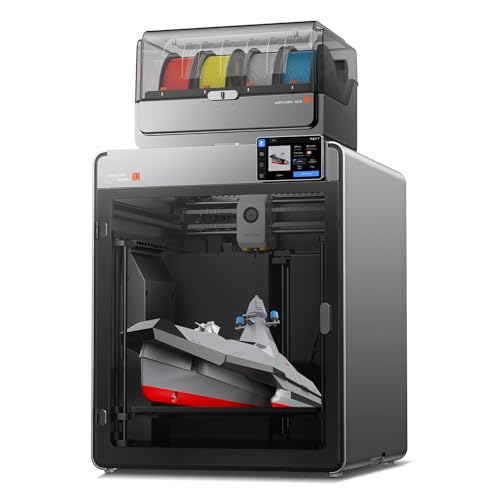
Anycubic Kobra S1 Combo
CoreXY · Enclosed · ACE Pro ready
250 x 250 x 250 mm build volume
$549.99$649.99
Verified
Last reviewed
Anycubic's Kobra 2 Neo is a 220mm single-color printer capped at 250mm/s, the Kobra 3 is a faster 250mm printer that works with the ACE Pro color feeder, and the Kobra S1 is an enclosed CoreXY machine with a 320°C nozzle and the same feeder option. Choose by whether you want multi-color printing and an enclosure, then match the PLA's speed rating to the printer.
Right now 26 Anycubic PLA listings have and 3 Anycubic printers have an in-stock price verified in the last 24 hours.
Anycubic official site (opens in a new tab)Anycubic support (opens in a new tab)
This page covers three Anycubic FDM printers, using the spec tables on Anycubic's own store: the Kobra 2 Neo, the Kobra 3 and the Kobra S1. Anycubic also makes the ACE Pro, a filament hub that feeds several spools into one printer and doubles as a dryer, and its own PLA in Basic, PLA+ and High Speed versions. The Kobra 3 and Kobra S1 are sold either alone or as a Combo with the ACE Pro included. Check which version a listing includes before comparing offers.
The three models step up in a clear order, and two questions settle most choices.
If neither matters and your parts fit a 220mm bed, the Kobra 2 Neo covers PLA. If you want color later without an enclosure, the Kobra 3 is the middle step.
Anycubic's Kobra 3 spec table (opens in a new tab) lists a 250 x 250 x 260mm volume, a 300°C nozzle, a 110°C bed and a 600mm/s maximum, with 300mm/s given as the recommended speed. It has a direct drive extruder, LeviQ 3.0 auto leveling and a 0.4mm nozzle that can be swapped for 0.6 or 0.8mm. Listed materials are PLA, PETG and TPU. The Kobra 3 Combo page (opens in a new tab) adds the ACE Pro and notes that TPU is not compatible with the ACE Pro, so flexible spools go through the printer's own path.
The Kobra S1 (opens in a new tab) is a fully enclosed CoreXY printer with a 250 x 250 x 250mm volume, a 320°C nozzle, a 120°C bed and 600mm/s maximum. Nozzle options run from 0.25 to 0.8mm around the stock 0.4mm. It includes a camera and LeviQ 3.0 leveling, and lists PLA, PETG, TPU, ABS and ASA. The S1 Combo (opens in a new tab) bundles the ACE Pro for four or eight colors.
Anycubic
CoreXY · Enclosed · ACE Pro ready
250 x 250 x 250 mm build volume
$549.99$649.99
Verified
The Kobra 2 Neo tech specs (opens in a new tab) list a 220 x 220 x 250mm volume, a 260°C nozzle, a 110°C bed and 250mm/s maximum. It has an integrated direct extruder, LeviQ 2.0 leveling and a replaceable 0.4mm nozzle, and lists PLA, ABS, PETG and TPU. Files load from a microSD card; the page does not mention Wi-Fi.
| Kobra 2 Neo | Kobra 3 | Kobra S1 | |
|---|---|---|---|
| Build volume | 220 x 220 x 250mm | 250 x 250 x 260mm | 250 x 250 x 250mm |
| Max nozzle | 260°C | 300°C | 320°C |
| Max speed | 250mm/s | 600mm/s | 600mm/s |
| Enclosed | Not stated | Not stated | Yes |
| ACE Pro | Not listed | Yes | Yes |
The Kobra 3 and S1 share a bed size and top speed; the S1 adds the enclosure, a hotter nozzle and bed, and a camera as standard. The Kobra 2 Neo is a separate tier, with a lower speed and temperature ceiling and no feeder.
Anycubic's own spools make the speed point clearly. PLA Basic (opens in a new tab) and PLA+ (opens in a new tab) are both rated 190 to 230°C and 200mm/s, while High Speed PLA (opens in a new tab) is rated 190 to 260°C and 600mm/s. On a Kobra 3 or S1, the High Speed line is the one rated for the printer's top speed. On the Kobra 2 Neo, every Anycubic PLA fits the 260°C nozzle limit, and the printer's 250mm/s cap is the lower figure.
For feeders, the ACE Pro page does not publish spool size limits. Its successor, the ACE 2 Pro, asks for 195 to 200mm flanges and 60 to 68mm widths and says to avoid cardboard spools (opens in a new tab); treat that as a guide, not a rule for the ACE Pro. Check spool lines against each printer on the Kobra 3 filament list, the Kobra S1 filament list and the Kobra 2 Neo filament list. For running cost, the price per kg page explains how listings with several spools are compared on net filament weight.
Anycubic's ACE Pro page lists the Kobra S1, Kobra 3, Kobra 3 V2 and Kobra 3 Max as compatible printers. The Kobra 2 Neo is not on that list.
No. Anycubic's Kobra 3 Combo page states that TPU is not compatible with the ACE Pro.
Yes. Anycubic lists CoreXY construction and a fully enclosed frame for the Kobra S1.
Anycubic rates its High Speed PLA to 600mm/s and its Basic and PLA+ spools to 200mm/s. Above 200mm/s, the High Speed line is the one with a matching published rating.


1.75mm · 1kg
$102.59$113.99$102.59 per kg
Verified


Anycubic
$299.99$459.99
Verified
Anycubic
$899.99$999.99
Verified
Product prices and availability are accurate as of the date/time indicated and are subject to change. Any price and availability information displayed on Amazon at the time of purchase will apply to the purchase of this product.